Creating Rewards
Rewards are what your customers redeem their points for. Create attractive rewards that encourage repeat purchases and increase customer lifetime value.
Accessing Rewards
Navigation:
Click Rewards (left sidebar) → Add Reward
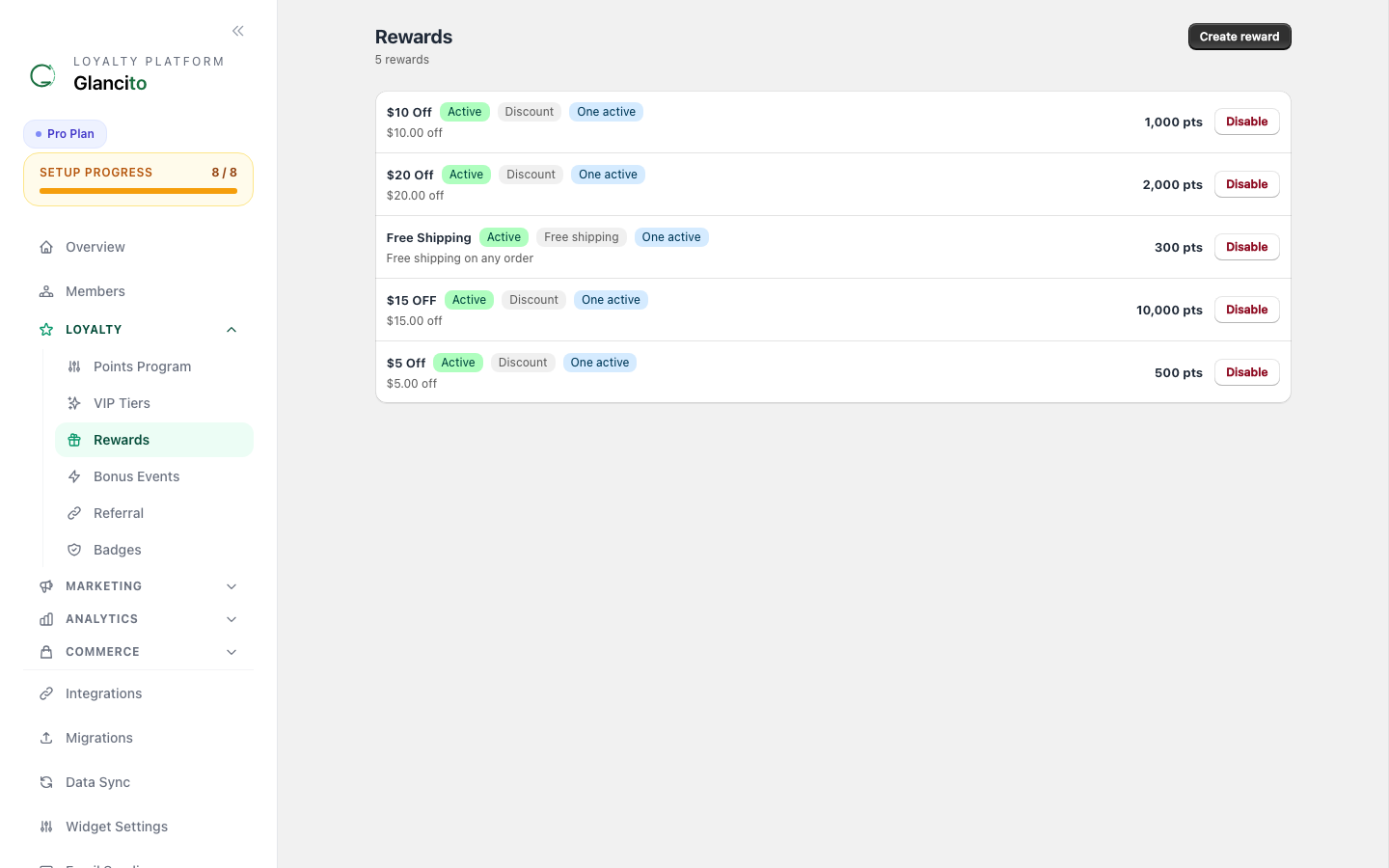
You'll see all your active rewards:
┌─────────────────────────────────────────────────────────┐
│ Rewards [Add Reward ↻] │
├─────────────────────────────────────────────────────────┤
│ │
│ Your Rewards (Sorted by popularity) │
│ │
│ ┌────────────────────────────────────────────────────┐ │
│ │ 🏆 $10 Off Your Next Order │ │
│ │ ✅ Active · Points Required: 1000 │ │
│ │ Redeemed: 342 times · Revenue Impact: +$4,250 │ │
│ │ [Edit] [×] │ │
│ ├────────────────────────────────────────────────────┤ │
│ │ 🏆 Free Shipping │ │
│ │ ✅ Active · Points Required: 500 │ │
│ │ Redeemed: 1,203 times · Very Popular │ │
│ │ [Edit] [×] │ │
│ ├────────────────────────────────────────────────────┤ │
│ │ 🏆 $50 Off – Premium Members │ │
│ │ ⏸️ Paused · Points Required: 5000 │ │
│ │ Redeemed: 45 times · Paused on Apr 1 │ │
│ │ [Edit] [×] │ │
│ └────────────────────────────────────────────────────┘ │
│ │
└─────────────────────────────────────────────────────────┘
Reward Types
1. Discount Code Reward
What it is: Fixed dollar amount or percentage off an order.
┌────────────────────────────────────────────────────┐
│ Create Discount Code Reward │
├────────────────────────────────────────────────────┤
│ │
│ Reward Name: │
│ [$10 Off Your Next Order] │
│ │
│ Description (shown to customers): │
│ [Save $10 on your next purchase] │
│ │
│ Points Required: [1000] │
│ │
│ Discount Type: │
│ ⦿ Fixed Dollar Amount ○ Percentage (%) │
│ │
│ Discount Value: │
│ ┌────────────────────────────────────────────┐ │
│ │ [$] [10] │ │
│ │ │ │
│ │ Minimum Purchase: [$50] (must spend this) │ │
│ │ │ │
│ │ Expiration: ☑ 30 days ☐ Never │ │
│ │ │ │
│ │ Limit Redemptions: ☐ Max 500 total │ │
│ └────────────────────────────────────────────┘ │
│ │
│ Customer Preview: │
│ 💰 $10 Off │
│ 1000 points required │
│ Valid for 30 days │
│ Minimum $50 purchase │
│ │
│ [Save] [Cancel] │
│ │
└────────────────────────────────────────────────────┘
Examples:
- "$10 Off" (fixed dollar amount)
- "20% Off" (percentage discount)
- "$25 Off Orders Over $100" (with minimum)
2. Free Product Reward
What it is: Customers redeem points to get a specific product for free.
┌────────────────────────────────────────────────────┐
│ Create Free Product Reward │
├────────────────────────────────────────────────────┤
│ │
│ Reward Name: │
│ [Free T-Shirt (VIP Only)] │
│ │
│ Description (shown to customers): │
│ [Choose any t-shirt from our collection] │
│ │
│ Points Required: [2500] │
│ │
│ Product Selection: │
│ ┌────────────────────────────────────────────┐ │
│ │ [Search products...] │ │
│ │ │ │
│ │ ☑ White T-Shirt (Inventory: 150) │ │
│ │ ☑ Blue T-Shirt (Inventory: 200) │ │
│ │ ☑ Black T-Shirt (Inventory: 75) │ │
│ │ ☐ Limited Edition Hoodie (Inventory: 12) │ │
│ │ │ │
│ │ Fulfillment: │ │
│ │ ⦿ Auto-send as gift (customer receives) │ │
│ │ ○ Manual confirmation (you approve each) │ │
│ └────────────────────────────────────────────┘ │
│ │
│ Customer Preview: │
│ 🎁 Free T-Shirt │
│ 2500 points required │
│ Choose from 3 colors │
│ │
│ [Save] [Cancel] │
│ │
└────────────────────────────────────────────────────┘
Best for:
- Promotional items with inventory to clear
- Premium products for high-point tiers
- Creating exclusivity ("VIP Only" products)
3. Free Shipping Reward
What it is: Customers can redeem points for free shipping on their next order.
┌────────────────────────────────────────────────────┐
│ Create Free Shipping Reward │
├────────────────────────────────────────────────────┤
│ │
│ Reward Name: │
│ [Free Shipping] │
│ │
│ Description (shown to customers): │
│ [Get free shipping on your next order] │
│ │
│ Points Required: [500] │
│ │
│ Free Shipping Settings: │
│ ┌────────────────────────────────────────────┐ │
│ │ Applies To: │ │
│ │ ⦿ All products & destinations │ │
│ │ ○ Specific countries only │ │
│ │ ○ Orders over specific amount │ │
│ │ │ │
│ │ Applicable Zones: [Domestic ▼] │ │
│ │ │ │
│ │ Valid For: [30] days │ │
│ │ │ │
│ │ ☑ Can be combined with other discounts │ │
│ │ ☐ Single use only (after use, expires) │ │
│ └────────────────────────────────────────────┘ │
│ │
│ Customer Preview: │
│ 🚚 Free Shipping │
│ 500 points required │
│ Valid for 30 days │
│ On any order │
│ │
│ [Save] [Cancel] │
│ │
└────────────────────────────────────────────────────┘
Why it works:
- Shipping is a common barrier to purchase
- Difficult to attach a static dollar value (shipping varies)
- Drives immediate order completion
4. Tiered Discount Reward
What it is: Different rewards at different point levels — spend more points, save more.
┌────────────────────────────────────────────────────┐
│ Create Tiered Discount Reward │
├────────────────────────────────────────────────────┤
│ │
│ Reward Name: │
│ [Tiered Savings] │
│ │
│ Description (shown to customers): │
│ [Save more by spending more points] │
│ │
│ Discount Tiers: │
│ ┌────────────────────────────────────────────┐ │
│ │ TIER 1 - $5 Off │ │
│ │ ├─ Points Required: [500] │ │
│ │ ├─ Discount Value: [$5] │ │
│ │ └─ Availability: [Active] │ │
│ │ │ │
│ │ TIER 2 - $15 Off │ │
│ │ ├─ Points Required: [1000] │ │
│ │ ├─ Discount Value: [$15] │ │
│ │ └─ Availability: [Active] │ │
│ │ │ │
│ │ TIER 3 - $50 Off │ │
│ │ ├─ Points Required: [2500] │ │
│ │ ├─ Discount Value: [$50] │ │
│ │ └─ Availability: [Active] │ │
│ │ │ │
│ │ [+ Add Another Tier] │ │
│ └────────────────────────────────────────────┘ │
│ │
│ Customer Preview: │
│ 💰 Tiered Savings │
│ Spend more points, save more │
│ 500 pts → $5 off │
│ 1000 pts → $15 off │
│ 2500 pts → $50 off │
│ │
│ [Save] [Cancel] │
│ │
└────────────────────────────────────────────────────┘
Why it works:
- Encourages customers to accumulate more points
- Creates multiple redemption paths
- Increases perceived value of the program
Creating a Reward: Step-by-Step
Step 1: Choose Reward Type
Click Add Reward and select your reward type:
┌─────────────────────────────┐
│ Choose Reward Type │
├─────────────────────────────┤
│ │
│ 💰 Discount Code │
│ [Choose ↗] │
│ │
│ 🎁 Free Product │
│ [Choose ↗] │
│ │
│ 🚚 Free Shipping │
│ [Choose ↗] │
│ │
│ 📊 Tiered Discounts │
│ [Choose ↗] │
│ │
└─────────────────────────────┘
Step 2: Fill in Basic Info
- Reward Name - What customers will see (e.g., "$10 Off")
- Description - Brief explanation (e.g., "Valid for 30 days on orders over $50")
- Points Required - How many points to redeem
Step 3: Configure Reward Details
Fill in the specific settings for your reward type (discount amount, products, expiration, etc.)
Step 4: Preview
See exactly how your reward will look to customers in their loyalty widget.
Step 5: Save
Click Save and your reward goes live immediately.
Managing Rewards
View Redemption Stats
Click any reward to see:
┌────────────────────────────────────────┐
│ Reward Details │
├────────────────────────────────────────┤
│ │
│ $10 Off Your Next Order │
│ │
│ Stats: │
│ ├─ Total Redemptions: 342 │
│ ├─ This Month: 47 │
│ ├─ Revenue Impact: +$4,250 (est.) │
│ ├─ Redemption Rate: 34% │
│ │ (of eligible members who saw it) │
│ └─ Last Redeemed: 2 hours ago │
│ │
│ Status: ✅ Active │
│ │
│ Expiration Setting: 30 days │
│ Remaining Budget: Unlimited │
│ │
│ [Edit] [Archive] [Delete] │
│ │
└────────────────────────────────────────┘
Edit a Reward
- Click Rewards
- Click the reward you want to change
- Click [Edit]
- Make your changes
- Click Save
Note: Editing only affects new redemptions. Codes already redeemed keep their original discount.
Pause a Reward
If you want to temporarily hide a reward without deleting it:
Toggle Status:
✅ Active → ⏸️ Paused → ❌ Archived
Paused rewards don't show to customers but the codes stay valid if already given out.
Delete a Reward
Click [Delete] to remove permanently. You'll see:
┌─────────────────────────────┐
│ Delete This Reward? │
├─────────────────────────────┤
│ │
│ "$10 Off" will be removed. │
│ │
│ Already-redeemed codes │
│ will still work. │
│ │
│ [Cancel] [Delete] │
│ │
└─────────────────────────────┘
Best Practices
Pricing Your Rewards
Rule of thumb: Point cost should be 2-3% of reward value.
Example calculations:
$10 off reward → Cost 500-750 points
Free shipping → Cost 300-500 points
$50 off reward → Cost 1500-2500 points
Free product ($30) → Cost 900-1200 points
Why? If points cost too little, your margin gets crushed. If too much, customers get frustrated.
Reward Mix
Create a mix of different price tiers:
Low Cost (300-500 pts):
- Free shipping
- $5 off
→ Achievable quickly, drives satisfaction
Mid Cost (1000-2500 pts):
- $10-25 off
- Free product
→ Takes 1-3 months, keeps engagement high
Premium (5000+ pts):
- $50+ off
- Multiple products
→ For VIP members, creates aspirational goal
Monitor Performance
Check Analytics → Rewards monthly:
- Which rewards get the most redemptions?
- Which drive repeat purchases?
- Which are ignored?
Disable underperforming rewards and emphasize high-performers.
Seasonal Rewards
Create limited-time rewards around holidays:
Examples:
April: Spring Sale ($15 off)
July: Summer Flash (free shorts)
December: Holiday Triple Points
These create urgency and prevent reward stagnation.
Common Questions
Q: How many rewards should I create? A: Start with 3-4 rewards (1 low-cost, 2 mid-cost, 1 premium). Add more based on what customers want.
Q: Can customers combine rewards? A: By default, no — one code per order. You can enable combining in advanced settings.
Q: What if I want to change a reward's point cost? A: Edit the reward. The new price applies to future redemptions, not past ones.
Q: How do I know if a reward is profitable? A: Check Analytics → Rewards for revenue impact estimates. A $10 reward should drive $30+ in sales to be worthwhile.
Q: Can customers stack points and redeem multiple rewards? A: No — one redemption per order by default. You can enable multiple redemptions in settings if desired.
Next Steps
- Run Your First Campaign to promote your rewards
- Set Up Earn Rules if you haven't already
- Check Analytics to see which rewards perform best