Your First Campaign
Campaigns are targeted emails that drive engagement, promote rewards, and increase sales. Start with your first campaign to announce your loyalty program.
Accessing Campaigns
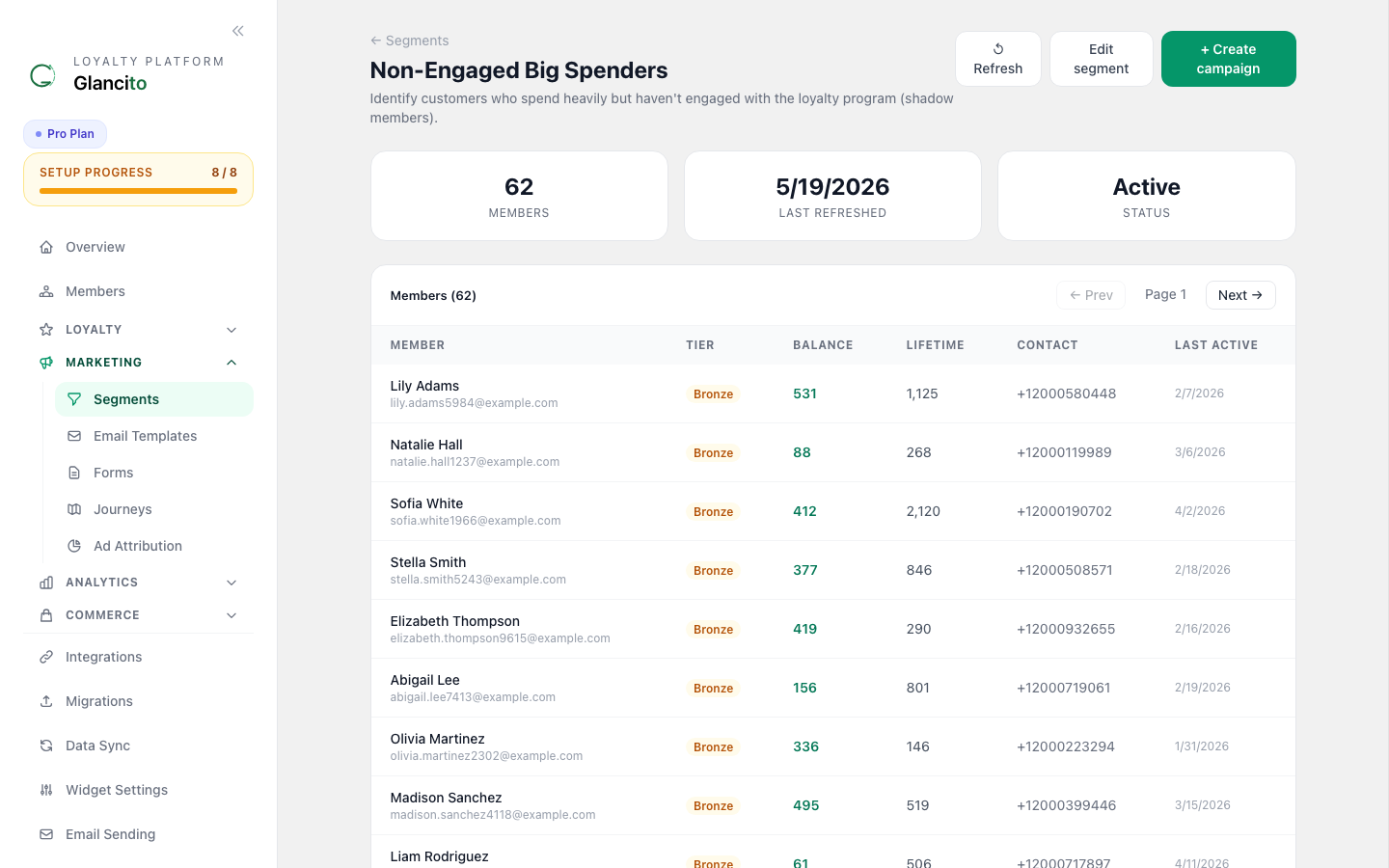
Campaigns are sent from within a Segment. Open Marketing → Segments, click any segment, then use the Send campaign button on that segment.
Create Your First Campaign: Step-by-Step
Step 1: Open the Campaign Modal
From any segment detail page, click Create Campaign:
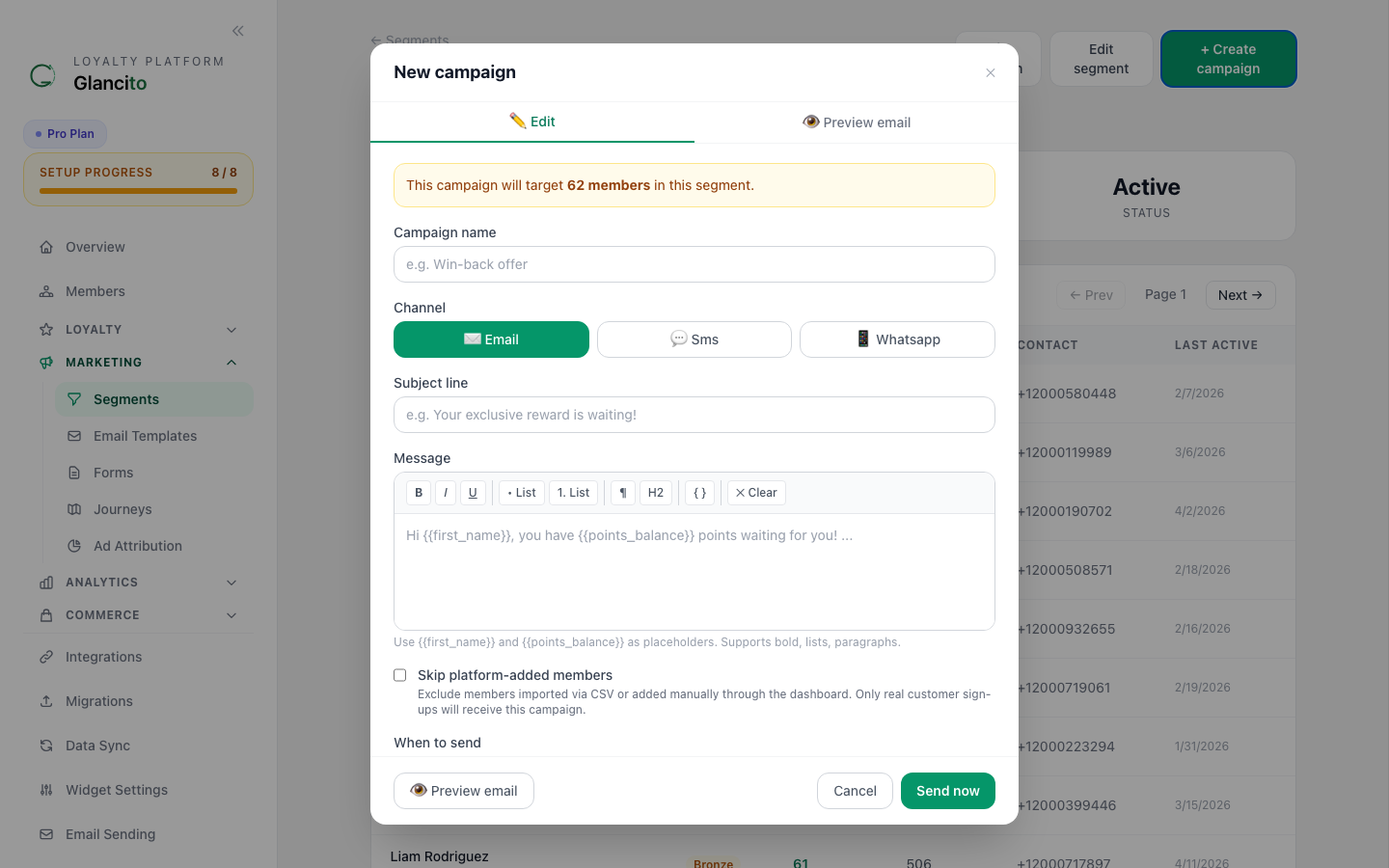
Fill in:
- Campaign name — internal label
- Channel — Email, SMS, or WhatsApp
- Subject — email subject line
- Body — email body; use
{{first_name}}and{{points_balance}}tokens for personalization - Email template — optionally select a saved template instead of writing raw HTML
- Discount offer — attach a discount offer so each member gets a code inserted as
{{ discount_code }} - Schedule — send immediately or pick a future date and time
Step 2: Write Your Email
Template for first campaign:
Subject: 🎉 Join Our Loyalty Program — Get 100 Bonus Points

Hi {'{'{first_name}'}'},

We're excited to introduce our brand new loyalty program!

Starting today, you can earn points on every purchase and redeem
them for exclusive rewards.

What You'll Get:
✨ 100 bonus points just for joining
✨ 1 point per $1 you spend
✨ Exclusive member-only discounts
✨ Birthday bonuses and special offers

Join now and see your rewards grow!

[Become a Member] ← Click here

Questions? Reply to this email — we're here to help!

The {'{'{store_name}'}'} Team
Step 3b: Attach a Discount Code (optional)
You can attach a Discount Offer to any campaign so each member receives a code with the email.
- Go to Discount Offers in the sidebar and create an offer first (static or unique pool)
- Back in the campaign composer, select the offer in the Discount offer dropdown
- Use
{{ discount_code }}in your email body — Glancito replaces it with each member's code at send time
Subject: Your exclusive offer is here

Hi {{ first_name }},

Here's a special code just for you:

{{ discount_code }}

Use it at checkout to save!
Static offer — everyone gets the same code (e.g. WELCOME10). Simple, high-volume safe.
Unique pool — each member gets a different code. Glancito assigns codes per member using a row-level lock so two members never receive the same code.
See Discount Codes for the full guide.
Step 3: Schedule and Send
In the Schedule field in the campaign modal, choose Send now or pick a specific date and time for a scheduled send.
Click Create to save the campaign as a draft. From the segment detail page, click Send next to the campaign to queue it for delivery.
Glancito validates that the segment has at least one filter rule before allowing send — this prevents accidental broadcasts to your entire member list.
Campaign Types
1. Engagement Boost
Goal: Re-activate inactive members When: Members haven't purchased in 30-60 days
Subject: "We Miss You! 50% Extra Points This Weekend"

Hi {'{'{first_name}'}'},

It's been a while since you've shopped with us. Here's a special
offer just for you:

This weekend only, earn DOUBLE points on any purchase!

That $50 purchase becomes 100 points instead of 50. 🚀

[Shop Now]

Best,
The Team
2. Reward Announcement
Goal: Drive redemptions and repeat purchases When: You create a new reward
Subject: "New Reward Alert: $25 Off Is Here! 🎁"

Hi {'{'{first_name}'}'},

We just launched an amazing new reward, and you might already have
enough points to claim it!

$25 Off Your Next Order
Points Required: {'{'{points_needed}'}'} (You have: {'{'{points_balance}'}'})

{'{'{#if_can_redeem}'}'}
You're eligible NOW! Claim your reward:
[Redeem Now]
{'{'{/if_can_redeem}'}'}

{'{'{#if_cannot_redeem}'}'}
Just {'{'{points_until_eligible}'}'} more points to go!
[See How to Earn]
{'{'{/if_cannot_redeem}'}'}

Best,
The Team
3. Milestone Celebration
Goal: Celebrate and encourage ongoing engagement When: Member reaches points milestone (100, 500, 1000 pts)
Subject: "🏆 Congratulations! You've Earned 1,000 Points!"

Hi {'{'{first_name}'}'},

Amazing! You've reached 1,000 loyalty points. 🎉

Here's what that means:
✨ You're in the top 10% of our members
✨ You can now redeem for our premium rewards
✨ You've saved an average of $40 with our program

Your Available Rewards:
• $25 Off (1000 pts) ← You're eligible!
• Free Shipping (500 pts)
• $50 Off (2500 pts) ← Almost there!

[View All Rewards]

Keep earning!
The Team
4. Point Progress
Goal: Encourage completion of goals When: Member is close to a reward threshold
Subject: "You're {'{'{points_until_reward}'}'} Points Away From {'{'{reward_name}'}'}!"

Hi {'{'{first_name}'}'},

You're so close! 🎯

You have: {'{'{points_balance}'}'} points
You need: {'{'{points_required}'}'} points
You're missing: {'{'{points_until_reward}'}'} points

That's just one ${'{'{points_until_reward}'}'} purchase away from
redeeming {'{'{reward_name}'}'}!

Complete your next order and claim it:
[Shop Now]

The Team
5. New Collection Launch
Goal: Drive awareness and purchases When: You launch new products
Subject: "New Collection Just Dropped! Earn 2X Points Today 🚀"

Hi {'{'{first_name}'}'},

Our spring collection just arrived, and loyalty members get a
special benefit today:

Earn 2X points on everything in the new collection!

That means on a $50 purchase, you'll earn 100 points instead of 50!

[Shop New Collection]

Available for today only!

The Team
Best Practices
Know Your Numbers
Before sending:
- Check your audience size
- Look at recent send open rates
- Review what worked before
Example review:
  Audience: 12,450 members
  Expected Open Rate: 25-35%
  Likely Opens: 3,100-4,350 members
  Expected Clicks: 5-10% of opens = 150-400 clicks
  Expected Sales: 2-5% of clicks = 3-20 orders
Timing Matters
Best times to send (varies by audience):
- Weekday mornings (9 AM): Higher open rates
- Tuesday-Thursday: Best engagement
- Avoid: Mondays (crowded), Fridays (checking out)
- Timezone: Send to your largest market timezone first
Use Personalization
Tags to personalize:
{'{'}first_name{'}'}— "Hi Sarah,"{'{'}points_balance{'}'}— "You have 450 points"{'{'}tier_name{'}'}— "Gold Member Exclusive"{'{'}last_purchase_date{'}'}— "Since your last purchase on..."
Impact: Personalized emails get 26% higher open rates.
Keep It Short
Email structure:
- Greeting - 1 line
- Hook - 1-2 lines (why they should care)
- Offer details - 3-5 lines
- CTA button - 1 line
- Closing - 1 line
Total: 7-10 lines, ~100 words
Longer emails get ignored or marked as spam.
A/B Testing
Test different approaches:
Test 1: Subject Line
Send: 50% with "50% Extra Points This Weekend"
       50% with "Don't Miss Out — 50% Extra Points Today"
Winner: Whichever gets higher open rate

Test 2: CTA Text
Send: 50% with "Shop Now"
       50% with "Earn Bonus Points"
Winner: Whichever gets higher click rate
Check results in Campaign Analytics after send.
Campaign Analytics
After sending, open the campaign from the segment detail page to see delivery and engagement metrics: sent count, bounces, opens, clicks, and unsubscribes.
What Good Looks Like
| Metric | Good | Excellent |
|---|---|---|
| Open Rate | 20-30% | 35%+ |
| Click Rate | 3-5% | 7%+ |
| Conversion Rate | 0.5-1% | 2%+ |
| Unsubscribe | less than 0.5% | less than 0.1% |
Common Campaign Mistakes
❌ Sending too often - More than 1x per week leads to unsubscribes ✅ Do: Send 1-2 campaigns per month
❌ Generic subject lines - "Hello" or "Update" get ignored ✅ Do: Use numbers, questions, or urgency ("Your Points Just Increased!")
❌ No clear CTA - Hidden buttons or no action ✅ Do: Big, obvious button with action text
❌ Confusing design - Hard to read on mobile ✅ Do: Test on phone, keep it simple
❌ Not mobile optimized - 50% open on mobile ✅ Do: Preview and test on phones
Next Steps
- Create Segments to send campaigns to specific groups
- Check Analytics to see campaign performance trends
- Create More Rewards to promote via campaigns