Member Profiles
Every customer enrolled in your loyalty program has a profile. Use member profiles to view engagement, grant/deduct points, and take targeted actions.
Accessing Member Profiles
Members List
Click Members in the left sidebar:
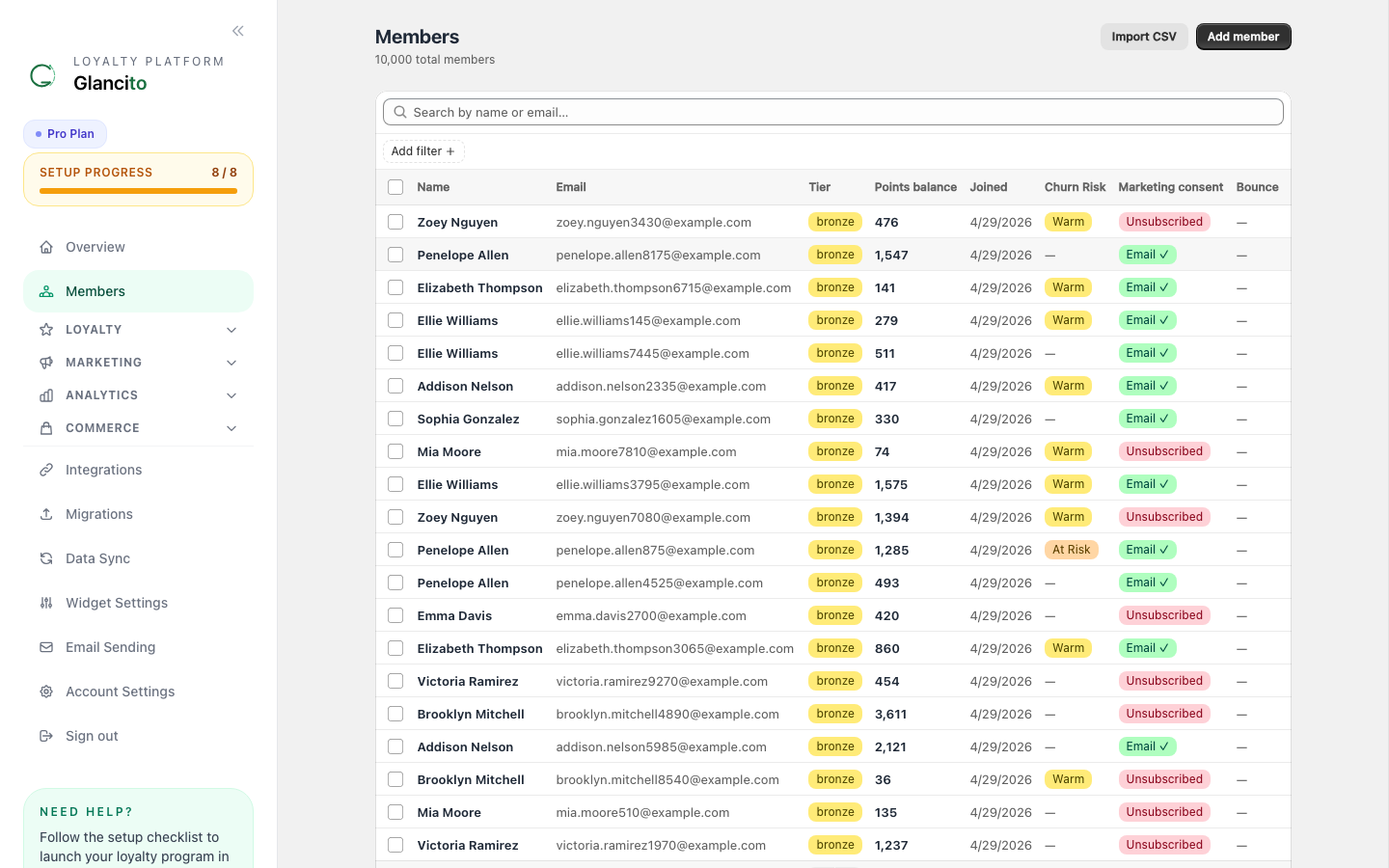
The table shows name, email, tier badge, points balance, join date, churn risk, marketing consent, and bounce status. Use the search bar and Add filter to narrow the list.
Member Profile
Click any row to open the full profile:
The profile shows points balance, lifetime earned/burned, total orders, total spend, predicted 12-month LTV, health score, tier and churn-risk badges, earned badges, segment memberships, and tabs for the full timeline and notes.
Profile Sections
1. Overview Tab
The top section shows:
- Name & Email - Contact information
- Phone & Address - Customer location data
- Joined Date - When they enrolled
- Birthday - For birthday bonus tracking
- Points Summary - Current, lifetime, and spent
- Tier Status - VIP tier if applicable
- Lifetime Value - Est. total revenue from this customer
2. Transactions Tab
View all point activity — date, type (Earned / Redeemed / Granted / Deducted), points amount, and the source description (order number, rule name, or admin note). Use the filter dropdown to narrow by type, or export to CSV.
3. Orders Tab
View all purchases synced from Shopify: order number, date, amount, and points earned per order. Total lifetime spend and average order value are shown at the bottom. Synced automatically from Shopify.
4. Marketing Consent & Bounce Status
Every member shows their email and SMS marketing preferences, unsubscribe status, and any email bounce recorded by AWS SES.
The profile shows email consent, SMS consent, unsubscribe status, and any email bounce recorded by AWS SES. Hard-bounced members are automatically skipped in all future campaign sends.
Consent states:
- Email ✓ — member agreed to email marketing (shown in Members list as green badge)
- Email ✗ — not consented; campaigns automatically skip this member
- SMS ✓ — member agreed to SMS marketing
- Unsubscribed — member clicked Unsubscribe; Glancito and Shopify both suppress all future marketing
Bounce types:
- Hard bounce — permanent failure (invalid address, domain gone). No further emails are sent.
- Soft bounce — temporary failure (mailbox full, server down). Recorded but does not block sends.
5. Segments Tab
Shows all segments this member belongs to. Use Add to Segment to manually include them in a segment, or Remove to exclude them.
Segments are used for:
- Targeted email campaigns
- Special offers
- VIP treatment
6. Referrals Tab (if enabled)
Shows the member's unique referral link, number of successful referrals, total points earned from referrals, and the list of referred friends with their purchase status.
Quick Actions
Grant Points
Click Grant Points on the member profile, enter the amount, select a reason, and optionally add an internal note. Use cases: service recovery (late shipment, damage), contests, VIP bonuses.
Deduct Points
Click Deduct Points to remove points for refunds, cancelled orders, or error corrections. Enter the amount and an optional order reference.
Send Email
Click Send Email to compose a one-off personalized email directly from the member profile — useful for individual outreach without creating a campaign.
Add to Segment
Click Add to Segment to manually include the member in a specific segment.
Exporting Member Data
Export Single Member
Click [Export] on any profile to download their data as CSV:
Includes:
  - Personal info
  - Contact details
  - All transactions
  - Orders history
  - Points activity
Export All Members
From Members page, click [Export CSV] to download:
Includes:
  - All member contacts
  - Current point balances
  - Lifetime points earned/spent
  - Member tier status
  - Enrollment date
Great for:
- Email list building
- Analysis in Excel/Sheets
- CRM integrations
- Backup/archiving
Best Practices
Using Member Profiles for Service
Situation: Customer calls about their points
✓ Look them up by name or email
✓ See their transaction history
✓ Check what rewards they can redeem
✓ Grant/deduct points if needed
✓ Send follow-up email confirmation
Example workflow:
- Search: "sarah@example.com"
- Check: Last transaction was 5 days ago (order #12450)
- See: Current balance is 1,250 points
- Action: They qualify for the $10 Off reward (1000 pts)
- Send: Email with the discount code
VIP Care
For high-value customers:
- Tag them in a "VIP" segment
- Grant occasional bonus points (surprise & delight)
- Email them exclusive rewards first
- Send personalized thank-yous
Retention Actions
If a member hasn't purchased in 60+ days:
- Check their last purchase date
- Send a "we miss you" email
- Grant 200 bonus points to reactivate
- Highlight new rewards
Privacy & Security
✅ Encrypted in Transit - All data encrypted with SSL/TLS ✅ GDPR Compliant - Right to erasure, data portability ✅ CCPA Compliant - California consumer rights ✅ PCI DSS Level 1 - Payment data secure ✅ SOC 2 Type II - Third-party verified security
Member Data Rights
Customers can request to:
- View their data - see what you have on file
- Export their data - download in portable format
- Delete their data - right to be forgotten (with notice period)
To handle requests: Settings → Privacy & Compliance → Data Requests
Common Questions
Q: Can I manually create a member? A: Yes, click [Add Member] to enroll someone not yet in your system.
Q: What happens to points if a customer's account is deleted? A: Points are archived with the account. They don't disappear — just become inactive.
Q: Can I change a member's tier manually? A: Yes, on their profile under "Tier Status." Useful for VIP adjustments.
Q: Do edits to a member's profile sync back to Shopify? A: Only points adjustments sync. Personal info is managed separately in each system.
Q: How do I handle duplicate accounts? A: Merge them in Settings → Account Merge Tool. Points combine, history preserved.
Next Steps
- Create Segments to target groups of members
- Run Campaigns to engage your best members
- Check Analytics to see member lifetime value trends