Segments Overview
Segments are groups of members that share similar characteristics. Use segments to send targeted campaigns, create exclusive rewards, and monitor specific customer groups.
What Are Segments?
A segment is a filtered group of members. Instead of emailing all 12,000 customers the same message, you can:
- Email only the 3,000 high-spenders
- Email only the 1,500 inactive members
- Email only the 500 VIP members
- Create segment-specific rewards
Result: Better engagement, higher sales, happier customers.
Accessing Segments
Click Segments in the left sidebar under Marketing:
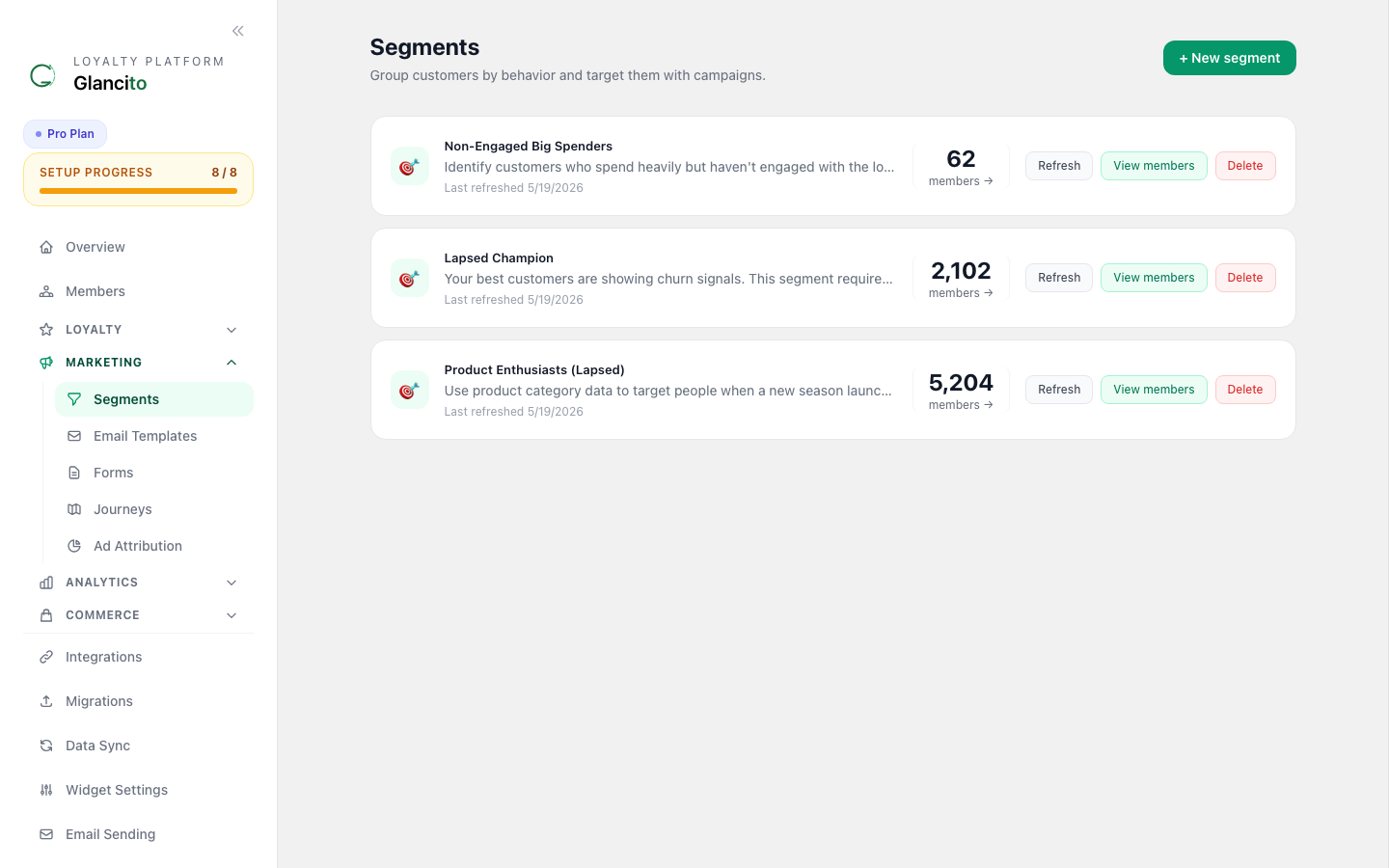
Each segment card shows its name, description, member count, and quick actions — Refresh, View members, and Delete.
Pre-Built Segments
Ready to use out of the box:
🌟 VIP Members
Criteria: Total spent > $2,500 OR points balance > 5,000 Size: Typically 3-5% of members Use: VIP-only campaigns, exclusive rewards, early access
Example campaign: "VIP Early Access: New Collection Launches Tomorrow!"
🔥 High-Value Customers
Criteria: Average order value > $100 AND 5+ purchases Size: Typically 10-20% of members Use: Premium rewards, loyalty appreciation, upsell campaigns
Example campaign: "Rewards Unlocked: New $50 Off Code Just for You"
⚠️ At-Risk / Churn
Criteria: Last purchase > 60 days ago AND had 2+ purchases Size: Varies (5-15% for healthy programs) Use: Re-engagement campaigns, win-back offers, retention
Example campaign: "We Miss You! 100 Bonus Points to Come Back"
📦 New Members
Criteria: Enrolled < 30 days ago Size: Daily new members Use: Welcome series, onboarding, encourage first purchase
Example campaign: "Welcome! Here's Your 100 Bonus Points"
🎯 Points Near Reward
Criteria: Points balance is 80-99% of a reward threshold Size: Varies (2-10%) Use: Encouragement campaigns, drive the last purchase
Example campaign: "You're So Close! One More Purchase Unlocks Your Reward"
🎂 Birthday This Month
Criteria: Customer's birthday is in the current month Size: ~8% of members (1/12 of active base) Use: Birthday bonuses, special offers
Example campaign: "Happy Birthday! Here's 300 Bonus Points From Us"
✨ Referral Active
Criteria: Has made at least 1 successful referral Size: Varies (5-25% for growth-focused stores) Use: Referral rewards, ambassador programs
Example campaign: "Keep Referring! You've Earned 2,000 Points This Quarter"
Creating a Custom Segment
Navigation
Click Segments → Create Segment in the top right.
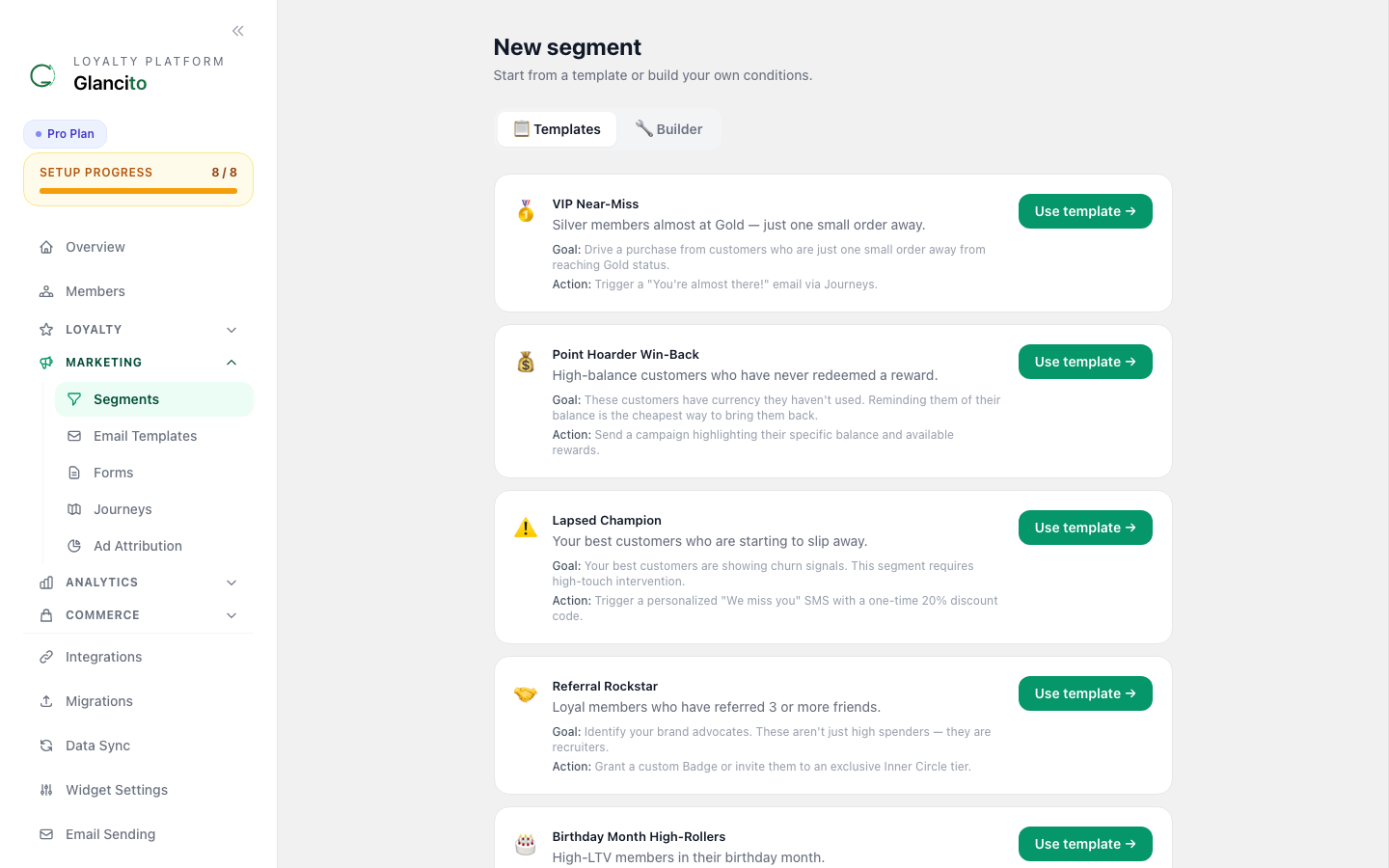
Fill in the segment name, optional description, and add filter rules. Each rule targets a field (e.g. last purchase date, lifetime spend, points balance, tier) with an operator and value. Use AND logic within a group and add multiple groups with OR logic between them.
Click Save — the segment is created, members are evaluated, and the count updates immediately.
The segment detail page shows the current member list and lets you send campaigns or refresh the count on demand.
Available Filters
When creating a custom segment, use these filters:
| Filter | Options | Example |
|---|---|---|
| Last Purchase | in last X days | Last 30 days |
| Lifetime Spend | > or < amount | Greater than $500 |
| Current Points | > or < amount | Less than 1000 |
| Tier Status | equals | Gold or above |
| Member Since | in last X days | Joined last 90 days |
| Purchase Frequency | X purchases in Y days | 3+ in last 60 days |
| Has Redeemed | yes/no | Has never redeemed |
| Referral Status | Made referral | Yes |
| Email Marketing Consent | yes/no | Consented to email |
| SMS Marketing Consent | yes/no | Consented to SMS |
| Email Bounce | hard/soft/none | No hard bounces |
| Email Status | Opens/Clicks/None | Never opens emails |
| Product Purchased | specific product | Bought red t-shirt |
| Collection Purchased | specific collection | Bought from Sale |
| Member Source | shopify / web_form / import / manual / api | Only web form signups |
Member Source Values
| Value | Who it matches |
|---|---|
shopify | Joined through the Shopify storefront or Shopify sync |
web_form | Signed up via an embedded Glancito signup form |
import | Imported via CSV or migrated from another platform (Klaviyo, Omnisend, etc.) |
manual | Added manually through the Glancito dashboard |
api | Added programmatically via the merchant API |
Use case: Exclude imported historical contacts from a campaign by filtering Member source is not one of import.
Using Segments
Send a Campaign
Click any segment, then Create Campaign to open the campaign modal:
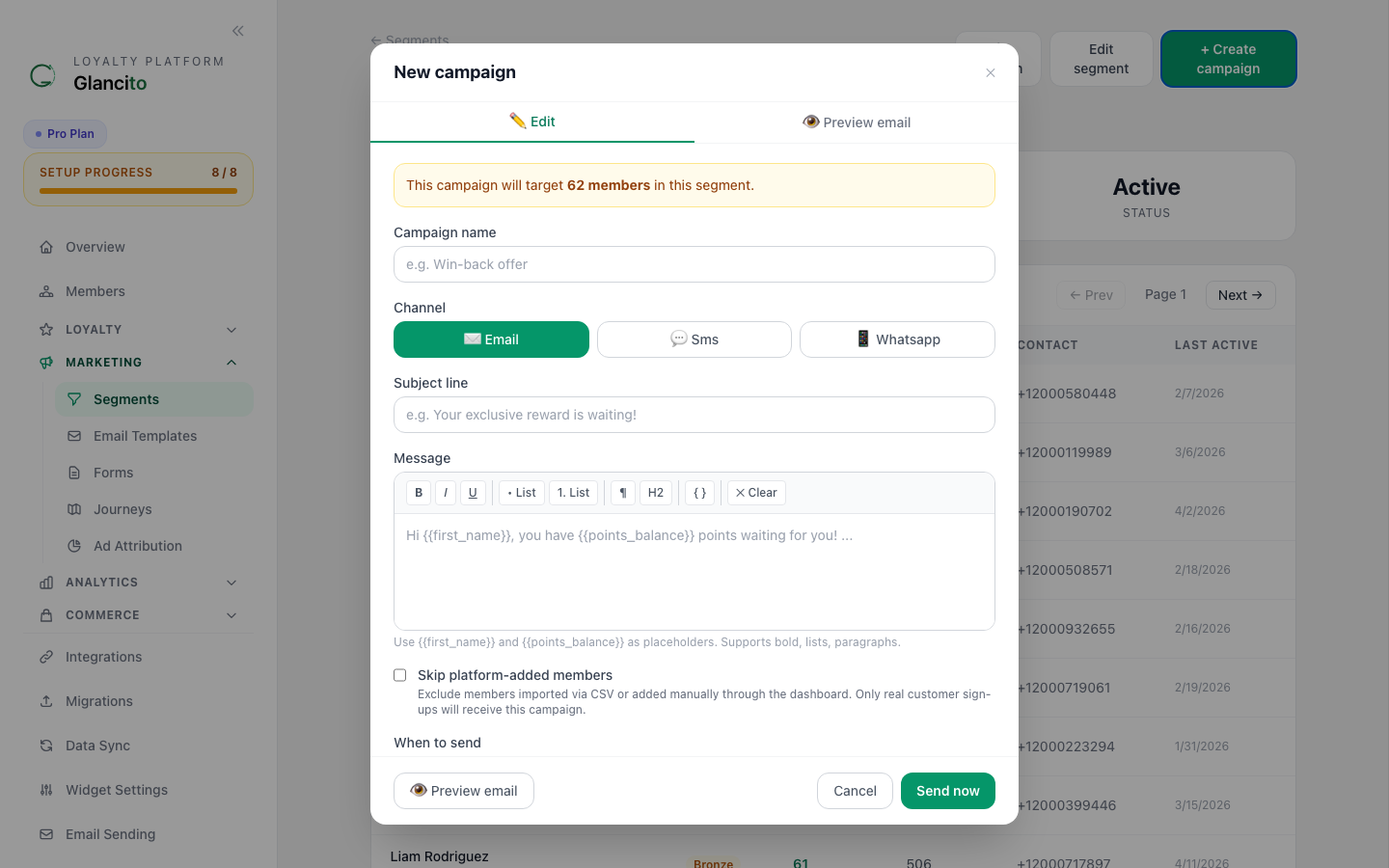
Fill in the campaign name, channel (Email / SMS / WhatsApp), subject, and body. Optionally attach a Discount Offer so each member receives their own unique code, and set a scheduled send time if you don't want to send immediately.
To include a discount code in the campaign, select a Discount Offer during campaign creation. Each member receives their own unique code (pool offer) or the shared static code, inserted automatically as {{ discount_code }} in the email body. See Discount Codes for setup details.
Skip platform-added members: Check "Skip platform-added members" in the campaign form to exclude contacts imported via CSV or added manually through the dashboard. Only members who signed up organically (through your Shopify store, embed form, or merchant API) will receive the campaign. This prevents bulk-imported historical contacts from receiving campaigns meant for engaged customers.
View Segment Members
Click a segment to open its detail page:
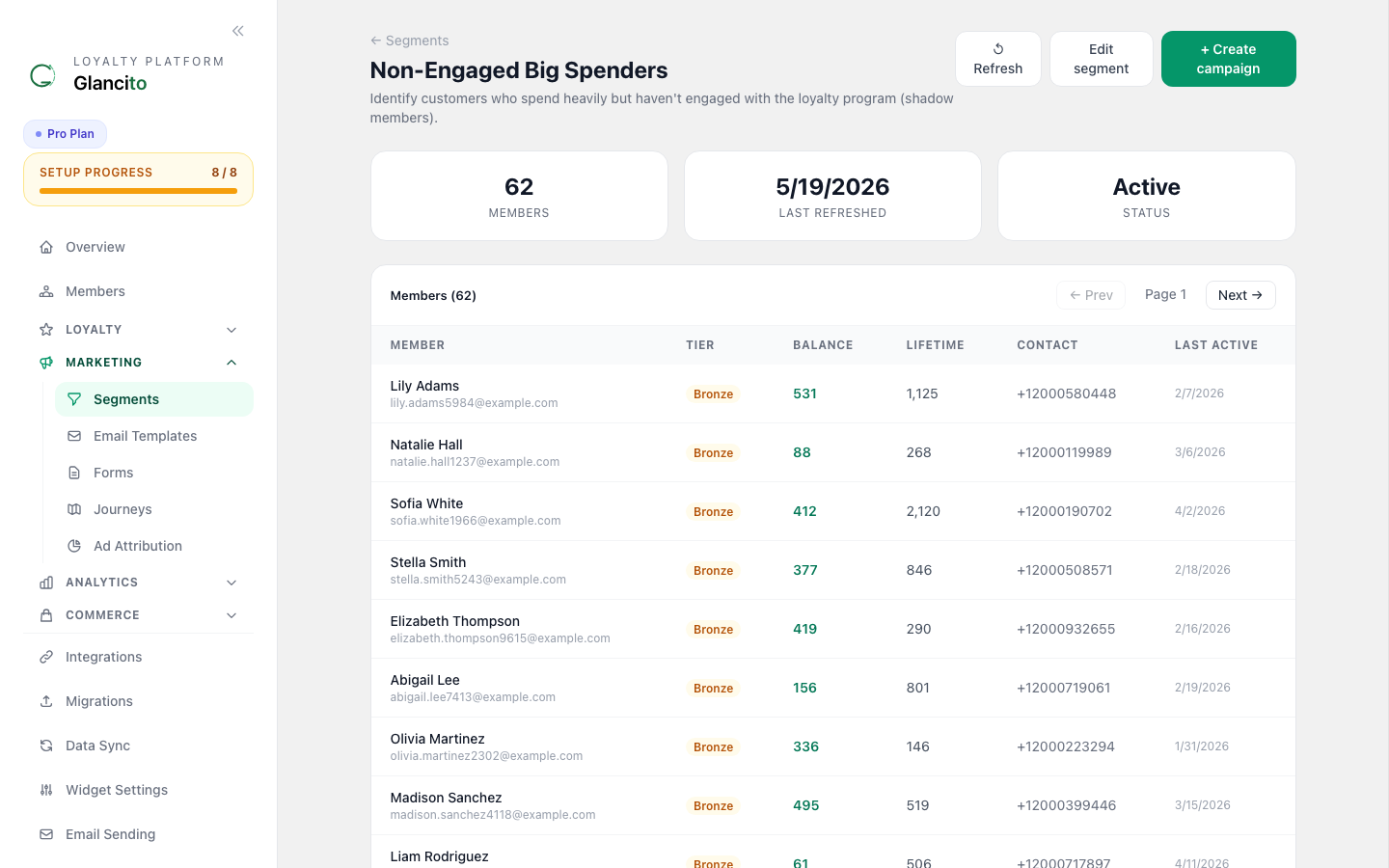
The detail view shows the full member list with email, tier, points balance, and last activity. Use Refresh to re-evaluate rules immediately, or Create Campaign to target this segment.
Export Segment
Click [Export CSV] to download all members in the segment for:
- CRM integration
- Email provider upload
- Data analysis
Edit Segment
Click [Edit] to adjust filters:
- Change date ranges
- Add/remove criteria
- Change AND/OR logic
Changes take effect immediately and member count updates.
Segment Strategy
Tier Your Customers
Create segments at different value levels:
Segment          Criteria              Members    Strategy
─────────────────────────────────────────────────────────
VIP              Spent >$5,000        2%        White-glove service
Premium          Spent $1,000-5,000   8%        Special perks
Regular          Spent $100-1,000     35%       Engagement
New              <30 days              15%       Onboarding
Inactive         >90 days no purchase  40%       Win-back
Tailor campaigns by tier:
- VIP: Premium rewards, early access
- Premium: Appreciation, upsell
- Regular: Engagement, retention
- New: Onboarding, first purchase incentive
- Inactive: "We miss you" offers
Seasonal Segments
Create time-based groups:
Segment              When Created    Use Case
──────────────────────────────────────────────────
Holiday Shoppers     Oct 1           Black Friday campaigns
Spring Cleaners      Feb 1           Spring collection
Back to School       Jul 1           School season
Summer Vacationers   May 1           Travel-related
Behavioral Segments
Focus on actions, not demographics:
Segment              Criteria                Use Case
──────────────────────────────────────────────────────
Cart Abandoners      Added item, no purchase Recovery campaigns
Email Openers        Opens 50%+ of emails   New product launches
Repeat Buyers        3+ purchases           Loyalty programs
Big Spenders         AOV >$150              Premium rewards
Review Writers       Left 2+ reviews        User-generated content
Referrers            Made 2+ referrals      Ambassador program
Performance Segments
Monitor outcomes:
Segment              Criteria                          Metric to Watch
───────────────────────────────────────────────────────────────────────
High Margin Buyers   Bought margin >40%               Profitability
Fast Deliverers      Converted in <24 hrs             Quick turnaround
Loyal Buyers         Every 30-45 days                 Repeat rate
High Redeemers       Redeemed 3+ times                Engagement
Churn Risk           Declining purchase frequency     Risk score
Best Practices
Start Simple
- Create 3-5 segments first
- Use pre-built templates
- Master them before complex custom segments
Use Descriptive Names
❌ "Segment 1" ✅ "High-Value + Inactive (At Risk)"
❌ "Group A" ✅ "Birthday Month — April 2025"
Test Segment Size
- Too small (fewer than 100 members): Limited campaign impact
- Too large (more than 10,000): Not targeted enough
- Sweet spot: 500-5,000 members per segment
Monitor & Update
- Review segments monthly
- Adjust filters based on results
- Delete underperforming segments
- Create new ones based on campaign learnings
Combine Segments for Campaigns
You don't have to send to just one segment:
Example campaign targets:
  All Members ÷ At-Risk Segment = 10,450 members

Send the same "we miss you" campaign to both
the At-Risk segment (high priority)
and a 10% sample of All Members (control group)
to measure effectiveness.
Common Segment Use Cases
"Nudge" Campaigns
Segment: Points Near Reward (80-99% toward next reward)
Campaign: "You're {'{'{points_until_reward}'}'} points away!"
Goal: Close the last purchase needed for redemption
"Thank You" Campaigns
Segment: High-Value Customers
Campaign: "Thank you for being a loyal customer!"
Goal: Retention, appreciation
"Win Back" Campaigns
Segment: At-Risk / Churn (90+ days inactive)
Campaign: "Special offer: 50% extra points this weekend"
Goal: Re-engage lapsed customers
"Exclusive" Campaigns
Segment: VIP Members
Campaign: "VIP-only: $100 off code (today only)"
Goal: Reward loyalty, create exclusivity
"Get to Know You" Campaigns
Segment: New Members (< 14 days)
Campaign: "Help us tailor your experience — take this 2-min survey"
Goal: Gather preferences, personalize
Advanced: Segment Rules
Some segments update automatically:
Dynamic Segments (update in real-time):

Birthday This Month
  ✓ Automatically updates as customers' birthdays arrive
  ✓ Size changes daily

Points Near Reward
  ✓ Automatically updates as points are earned
  ✓ Size fluctuates based on earning activity

New Members
  ✓ Automatically adds new enrollees
  ✓ Automatically removes after 30 days
Static Segments (you control updates):
- Spring Sale Shoppers
- Q1 High Spenders
- Your custom segments
Next Steps
- Send Your First Campaign to a segment
- Discount Codes — attach codes to campaigns
- Journeys — automate follow-ups after segment entry
- Check Analytics for segment performance
- Create Rewards for specific segments